Own your inbox.Everything included.
Self-hosted mail, calendars, contacts and files, with the enterprise
features in the box.
Most organizations rent their email and pay per seat for as long as they use it.
inbuxa lets you run it yourself, with a webmail people like
and a console that does the hard parts. It’s AGPL, it speaks open standards,
and your data stays where you put it.
Running your own email should be a reasonable choice, not a heroic one.
inbuxa is for organizations that want to own their email, and
for the people who run it for them. Everything they need is in every install.
Schools and districts
Student email without the per-seat bill or the foreign cloud.
Give each school its own tenant, with its own domains and administrator.
Students sign in through the directory you already run, and the mail stays on
hardware you choose.
A tenant per school
Single sign-on from your directory
Legal holds when a matter comes up
No per-seat bill, at any size
Small and medium businesses
Run your company’s email like an enterprise, without the enterprise invoice.
One installer puts the server, the console and the webmail on your machine.
The console does the hard parts, so the one person who looks after IT can
get on with the rest of it.
DNS records worked out for you
Delivery tracing for “did it arrive?”
Undelete for the Trash someone emptied
Guides for moving off Exchange, Zimbra and others
A migration tool that moves each mailbox across New
Open source organizations
Put your mail where your code is.
AGPL from end to end, and open standards throughout, so any standards client
works. Run it beside your forge, on infrastructure your project already
controls.
JMAP, IMAP, CalDAV, CardDAV and WebDAV
Sieve filters and SCIM provisioning
Source for every release, in public
Self-hosters
The mail server you’d build if you had a year. Someone did.
Mail, calendars, contacts and files from one install, with a webmail people
won’t complain about. Start on one VPS and spread it out later.
A server in one Rust binary
JMAP first, the older protocols when you want them
Nothing phones home
inbuxa is software you run, not a service we sell. No
mailboxes for sale, no account with us, and no paid tier.
Everything included
Nothing here waits for a license key.
Tenants, single sign-on, undelete and compliance are in every install, for a
household or a hundred organizations. Running mail for other people
shouldn’t need a bigger invoice.
× No license key
× No seat count
× No paid tier to upgrade to
× No telemetry, no accounts with us
Mail for other organizations
Give each organization you host its own tenant: its own domains, accounts and
administrator, and a ceiling on how much of the server it can use. One tenant
can't see or reach another's anything.
A different address for every site
Masked addresses deliver to your account without revealing it. Hand a new one
to each shop and service, and cut off any one of them without touching the
rest. Password managers can make them for you as you sign up.
Deleted, but not gone
Empty the Trash by mistake, or let a filter eat the wrong folder, and the
mail can still come back. Deleted mail, files, events, contacts and filters are
kept for a period you set, and restored by the user or an administrator.
Accounts from your identity provider
Connect Entra ID, Okta, Keycloak or any other SCIM 2.0 identity provider, and
people and groups are created, changed and removed on the mail server as they
are there. Nobody has to keep two lists of staff in step.
Each domain signs in its own way
One domain's people can sign in against its own LDAP or SQL directory, or its
own OpenID Connect provider, while every other domain uses the server's. A
tenant brings its directory with it.
Your logo, not ours
Set a logo for the whole server, for a tenant or for a single domain, and the
most specific one appears on the sign-in page, in the webmail and in calendar
invitations and reminders. Their email templates are yours to change too.
Spam filtering, and a model you run
The spam filter checks senders, content and reputation on every message as it
arrives. On top of it, you can add the opinion of a language model you host
yourself, as one more signal — off in a new install, and nothing is sent
anywhere you haven't configured. How it works.
See what the server did
Every delivery is traced and kept, and metrics are sampled into a history you
can search and chart. Watch deliveries live while you fix something, and set
alerts that tell you when a number crosses a line.
Mail that arrives
Outgoing mail is DKIM-signed with keys made for each domain. Incoming mail is
checked with SPF, DKIM and DMARC. Certificates come from Let's Encrypt on their
own, and the DNS records a domain needs are written out for you.
Calendars, contacts and files
Calendars and address books over CalDAV and CardDAV, so phones and desktop apps
sync with no extra software, and file storage over WebDAV. Invitations go out
by email, and reminders arrive when they should.
Filters that run on the server
Rules are Sieve scripts the server runs as mail arrives, so they work whichever
app is open, or none. Build them in the webmail, or manage them from any
ManageSieve client.
Room to grow
When one database isn't enough, read from replicas and spread message storage
across several stores. Most installs never need it; the ones that do don't have
to move to something else.
How it compares
Email you own, not email you rent.
Most organizations choose between renting a suite and running a mail stack built
for one person. inbuxa sits where those two don’t: self-hosted,
built for an organization, and nothing to pay for.
inbuxa compared with rented suites and other self-hosted mail stacks
Question
inbuxa
Rented suitesMicrosoft 365, Google Workspace
Self-hosted stacksMailcow, Mailu, Mail-in-a-Box, mox
Where your mail lives
On hardware you choose, in the country you choose
In the vendor’s data centers, in the regions it offers
On hardware you choose
What it costs
Your hardware and your time. No license key, no seats, no paid tier
A fee for every person, every month
Free software, on your hardware and your time
Running mail for an organization
Tenants, single sign-on, SCIM, undelete, legal holds, journaling and DLP, all included
Included, with holds and data-loss controls on the higher plans
Mostly built for a person or a few domains; it varies by project
Standards, and leaving
JMAP, IMAP, CalDAV, CardDAV, WebDAV, Sieve and SCIM. Your store is yours
IMAP plus the vendor’s own apps and APIs. Leaving means an export
IMAP, and often CalDAV and CardDAV
Who runs it
You, with a console that does the hard parts
The vendor. You manage people, not servers
You
Rent instead
If nobody in your organization wants to look after a server, or you rely on
Office co-editing or Exchange-only features today, a rented suite is the
better choice.
Pick a peer instead
If it’s mail for you and a few domains, Mailcow, Mailu, Mail-in-a-Box and
mox are mature, well documented and simpler to run. They’re great at it.
Pick inbuxa
If you want to own your email and still need what an IT department expects:
tenants, sign-on from your directory, undelete and compliance.
As of 5 October 2026. Microsoft 365 is a trademark of Microsoft Corporation and
Google Workspace a trademark of Google LLC. inbuxa is not
affiliated with or endorsed by any project or company named here.
What it looks like
The console, and the webmail
Ten screens from a demo install — its domains, people and traffic are
made up, the software is not. Everything here is included.
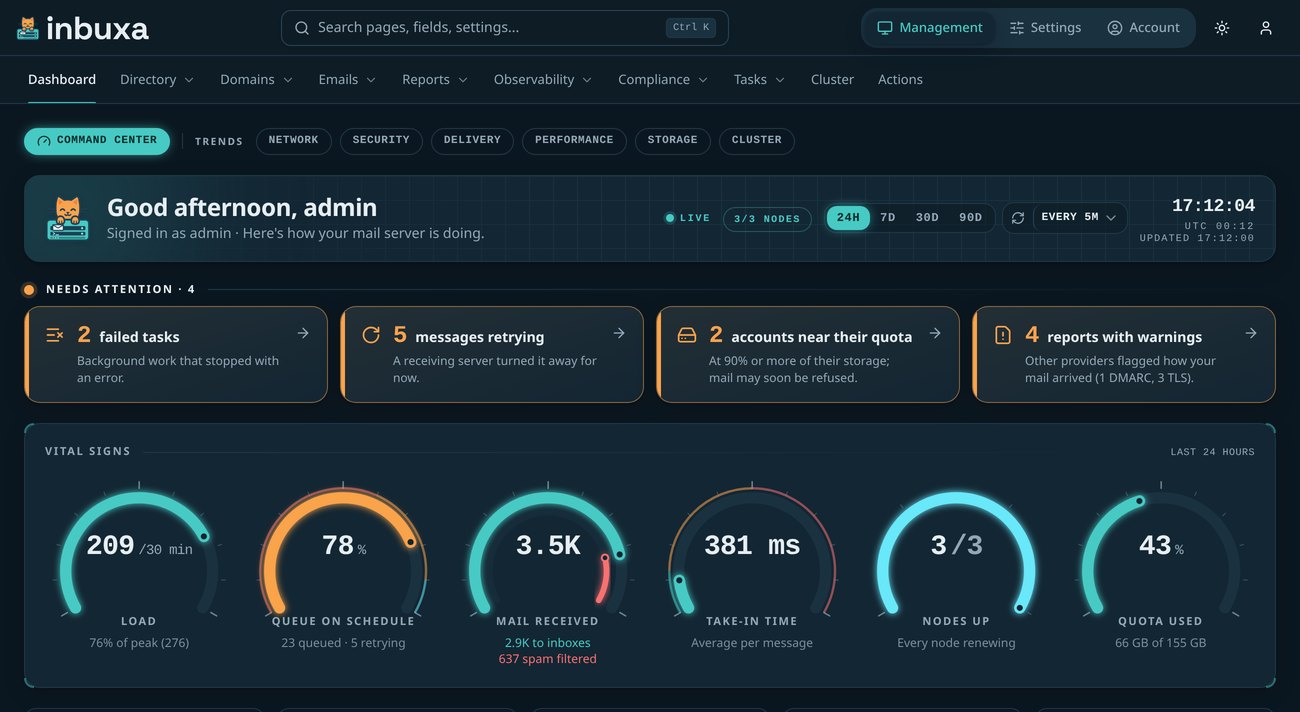
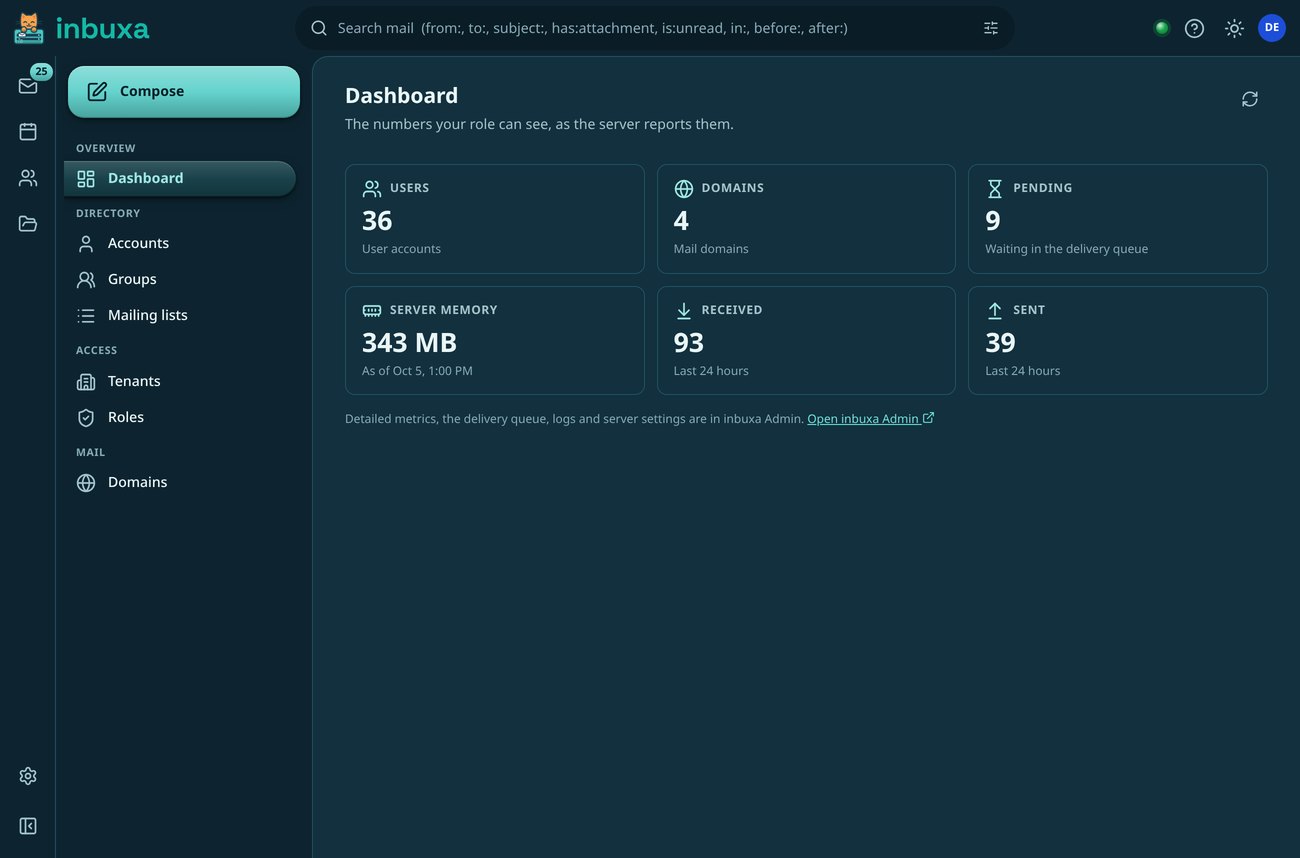
A dashboard that leads somewhere
Every figure is a way in, and the tiles across the top name what needs a
look today, each one opening where you would deal with it.
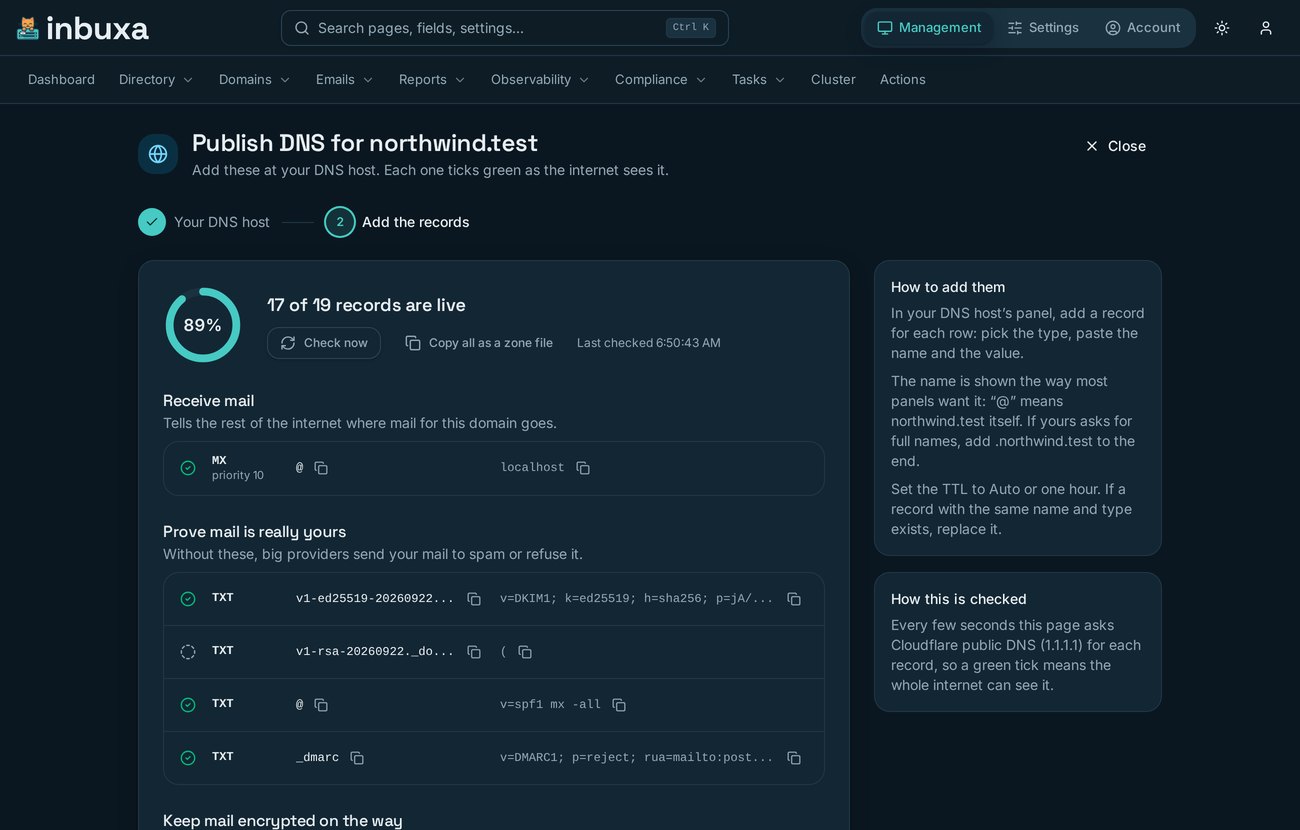
Jobs, not just pages of settings
Publishing a domain's DNS is a job the console walks you through, grouped
by what each record is for and ticking green as the internet catches up.
Give it your DNS provider's key and it writes them itself.
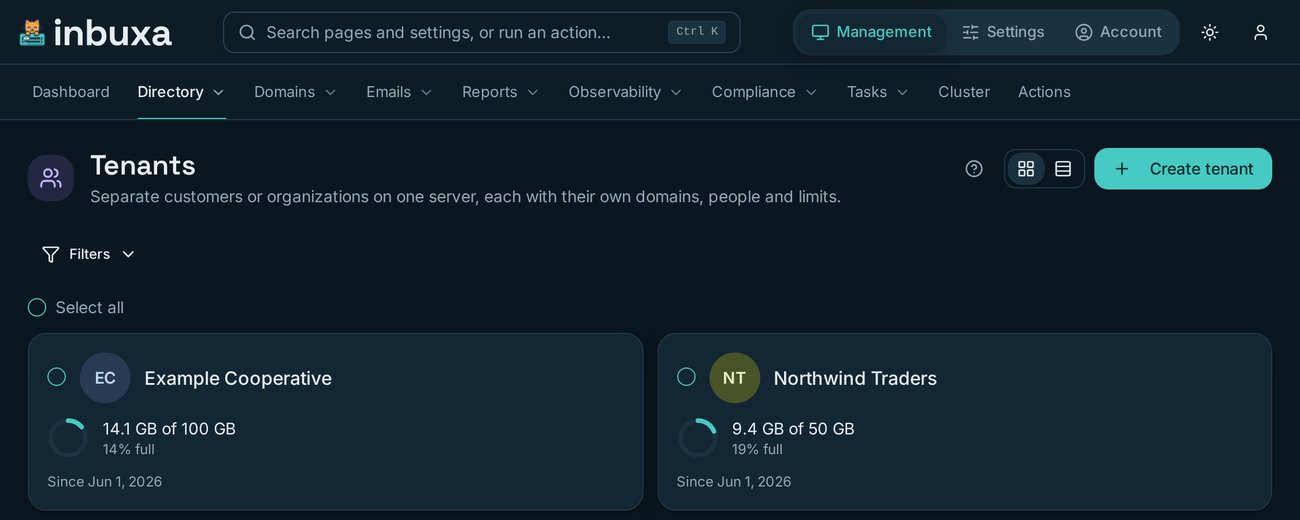
Mail for other organizations
Each tenant gets its own domains, accounts and administrator, and a ceiling
on what it may use. No tenant can see another's anything.
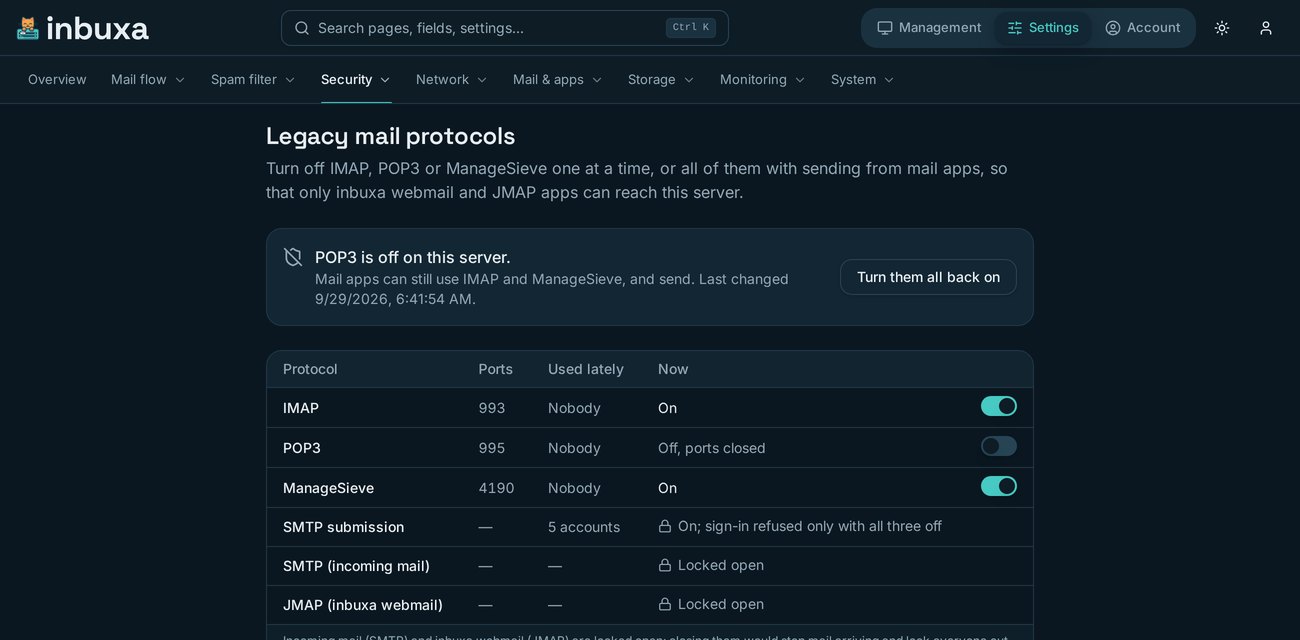
Close the old doors, knowing who is behind them
Switch IMAP, POP3 or ManageSieve off one at a time, or all of them at once
with sending from mail apps. Before you do, the page names everyone whose
mail app would stop working — and refuses to close the two doors that
would lock you out.
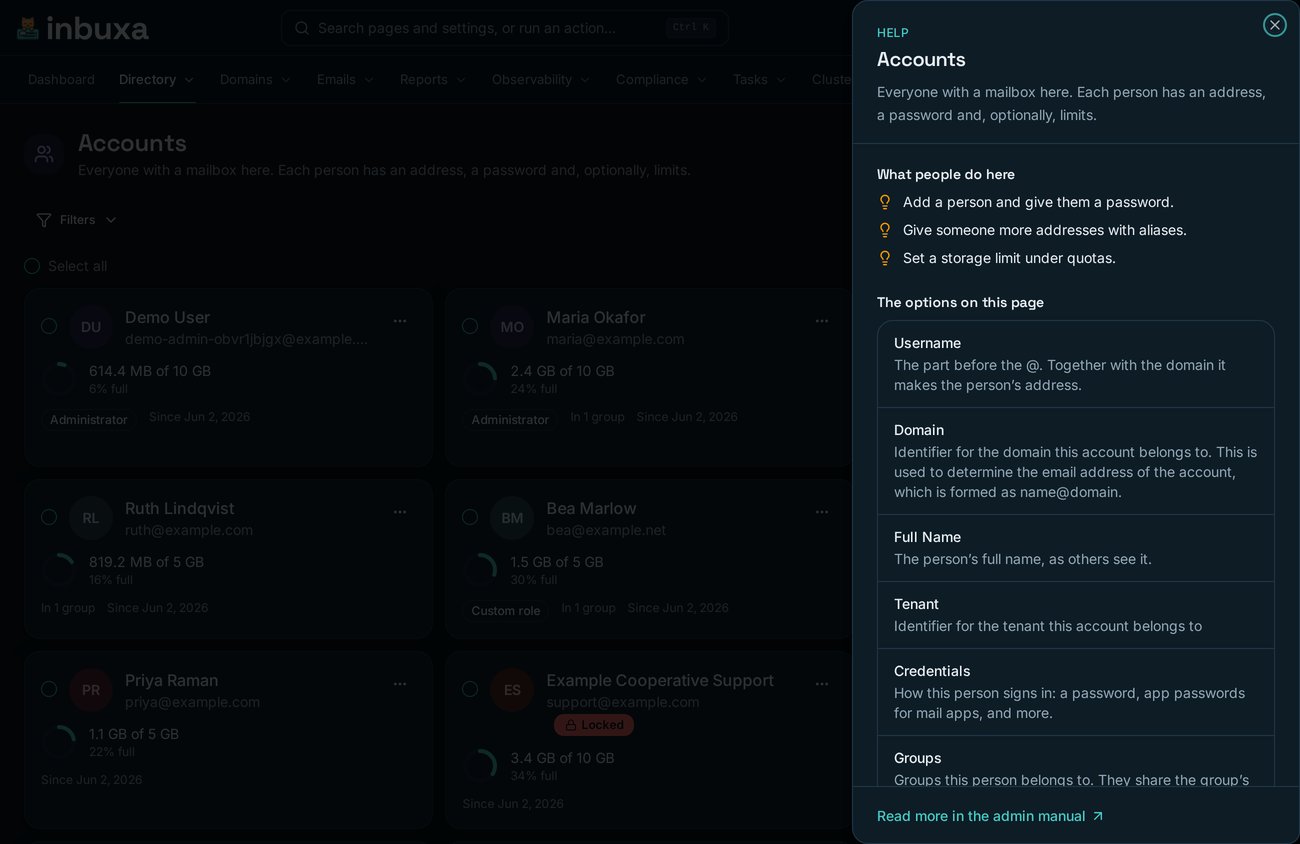
The manual is on the page you are on
Every page explains itself: what the job is, and what each option on it
does. No tab-switching to a documentation site to find out what a field
means.
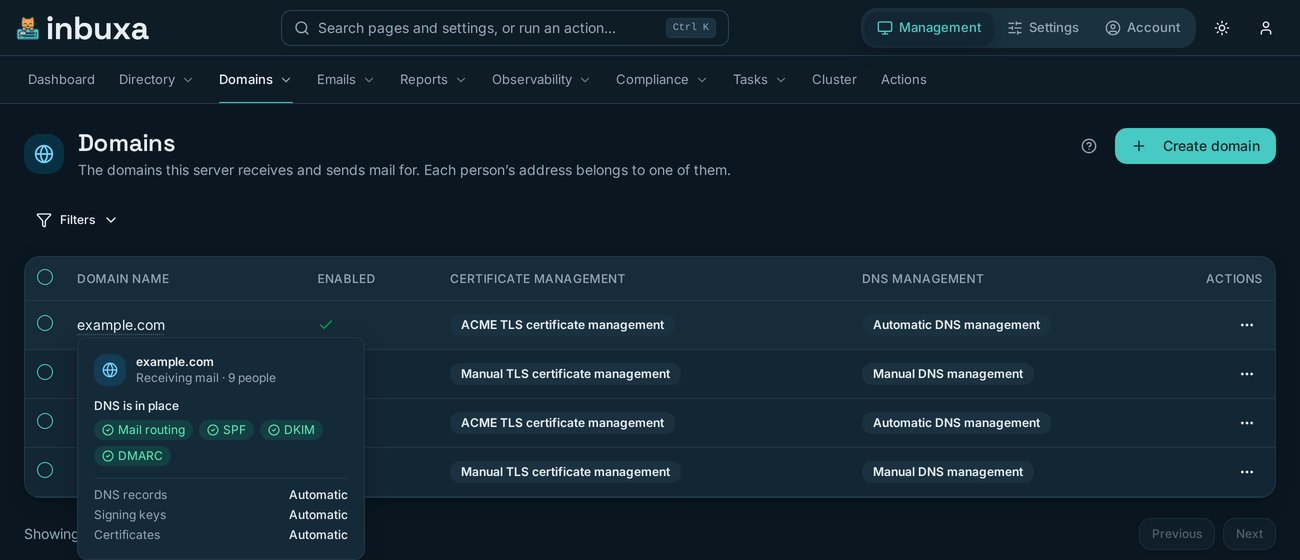
The facts without leaving the list
Point at any account, domain or tenant anywhere in the console and it tells
you what it is, what it uses and what it may do — without losing the
page you were working on.
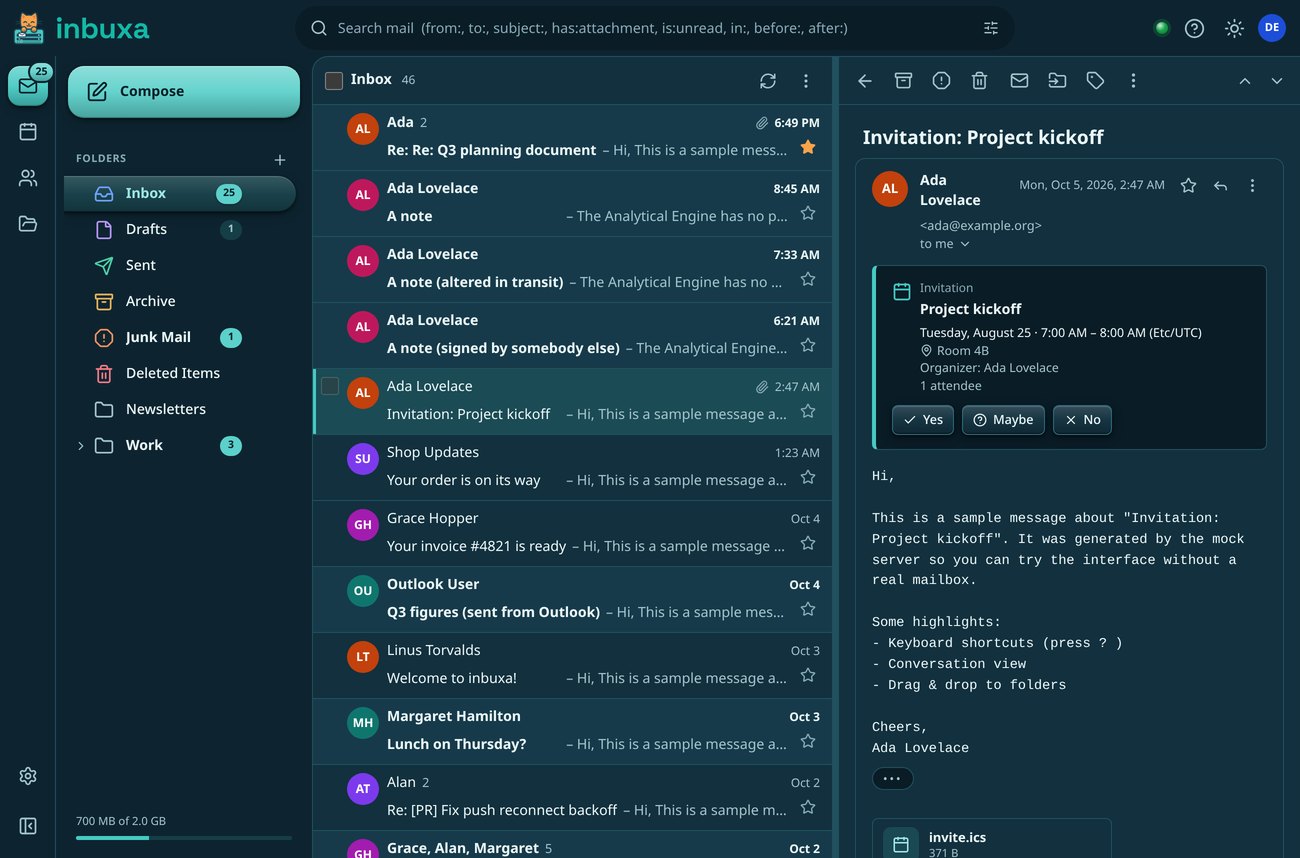
The webmail everyone else sees
Conversations, search that speaks the language of mail, invitations you can
answer in place, and the same interface on a phone. Nobody needs an account
on the console to use it.
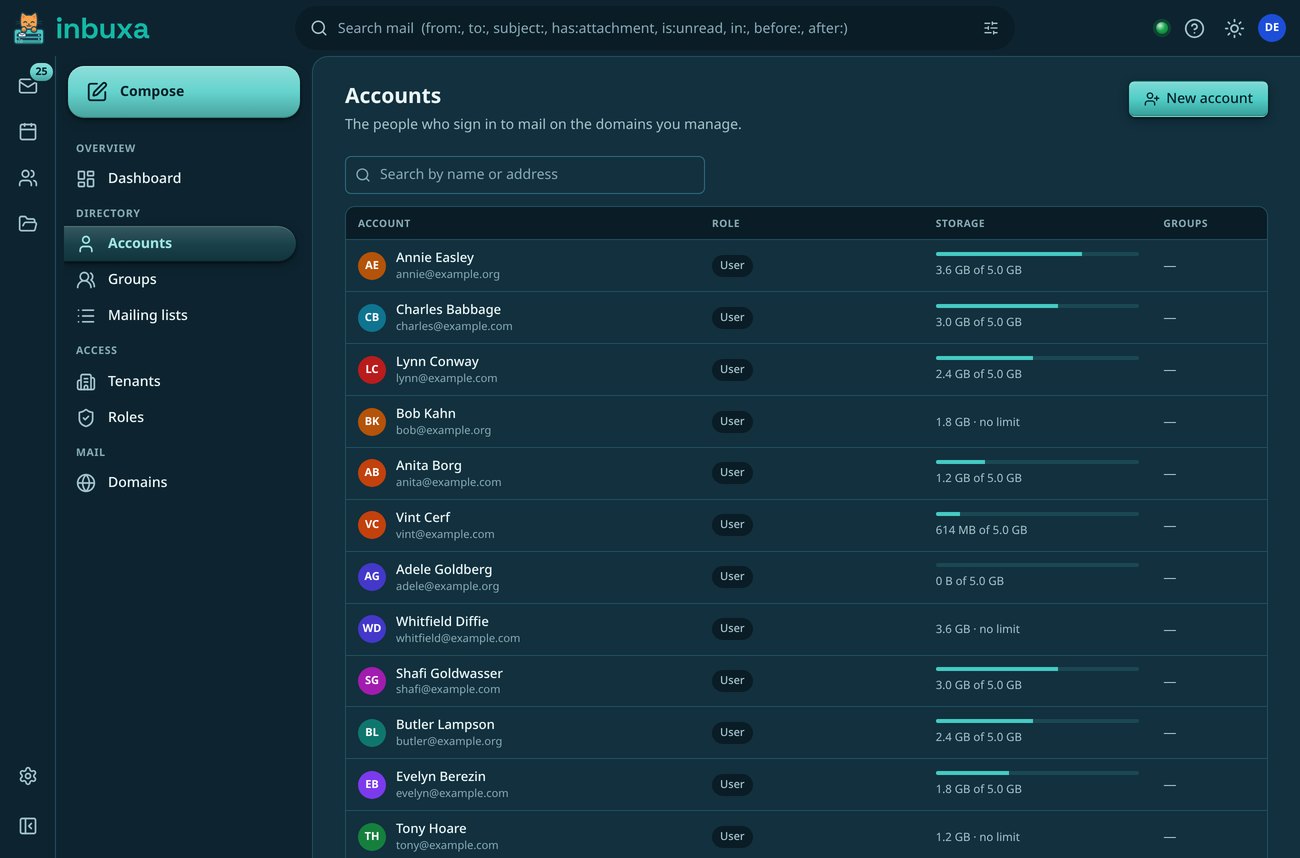
Support without opening the console
The webmail carries the everyday half of administration: accounts, groups,
mailing lists, domains, tenants and roles. Someone calls about their
mailbox and you fix it in the tab you are already in.
Only what that person may see
The menu is built from the signed-in account's own permissions, so a
helpdesk role gets the people and the lists and nothing else — and
only on a session signed in as “my own device”. The deeper
work waits in the console, one link away.
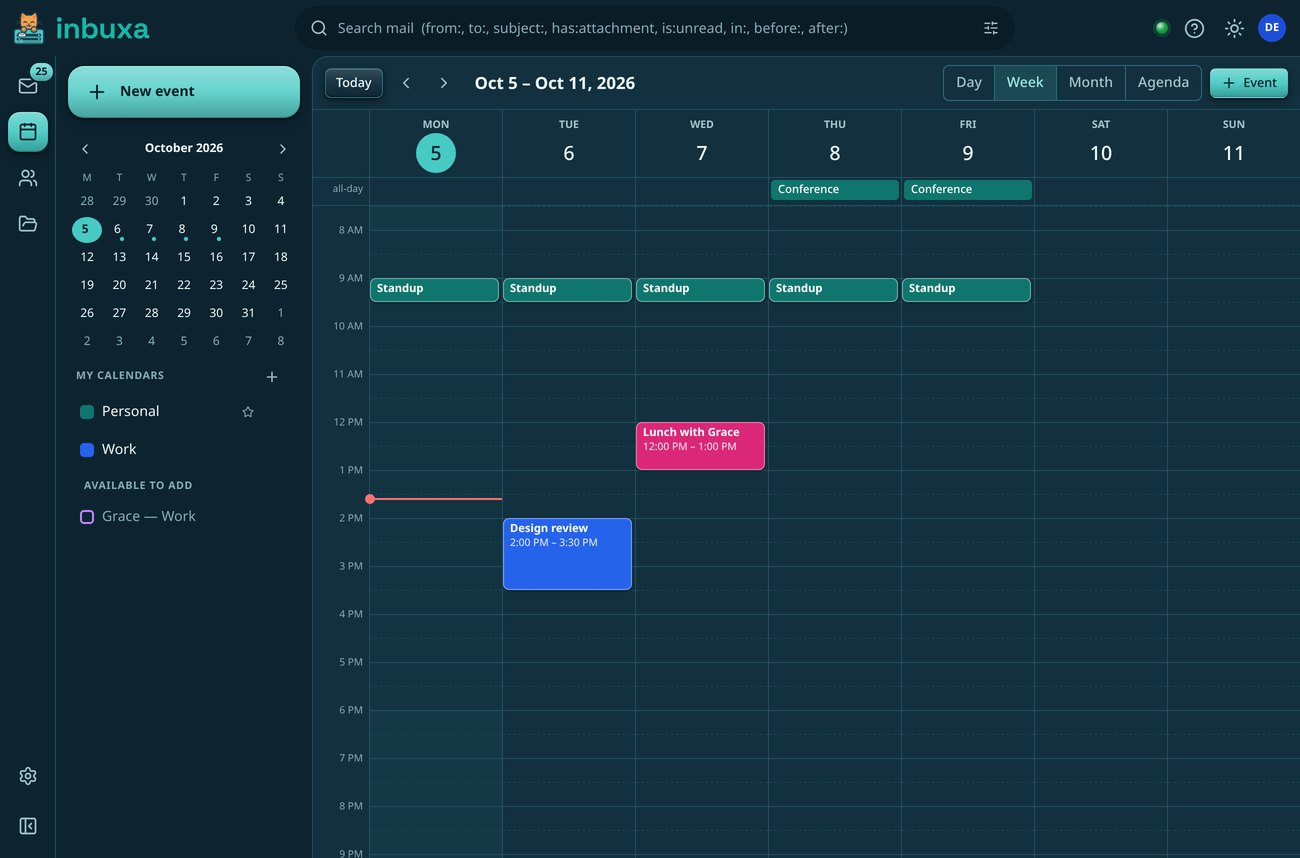
Calendars, contacts and files in the same place
The same server holds them, over the same standards any phone or desktop
client already speaks, so the webmail is a convenience rather than the only
way in.
A demo install, as it was on 29 September 2026 (the webmail on 5 October): sixteen domains, 241 accounts, and a day of
invented traffic. The tenants, help and hover-card shots are from the public demo on 7 October. Click a screenshot for
a larger view.
The suite
Three programs, an installer and a migration tool
The mail server, the console that runs it and the webmail people live in. Each
talks to the server over JMAP, so you can run them on one machine or three.
The mail server
inbuxa server
JMAP, IMAP, SMTP and DAV, the store, the filters and the administration API, in
one Rust binary or a container image. There is no web interface on it at all.
Every setting the server has, with dashboards, live delivery tracing and guided
jobs like publishing a domain's DNS. Its screens are built from the server's own
description of itself, so a new setting appears without a console release.
Mail, calendars, contacts and files for everyone with an account, on a phone as
readily as a desktop. Helpdesk staff can manage accounts from it too, without
opening the console. Built on ihasmail.
One program that puts the server, the console and the webmail on this machine,
completes first boot and writes out the DNS records you need. Each goes in a
container or straight onto the host, and the console and the webmail can go on
a machine of their own.
ihasvpn's WireGuard
server, brought into the suite: VPN access for the people who already have a mail
account, managed from the same console.
The migration tool New
inbuxa-migrate
Moves an account across with its mail, calendars, contacts, Sieve scripts and
files: from any IMAP, JMAP or DAV server, Maildir, Google Takeout, Exchange
Server or Exchange Online, and Stalwart. Each account passes through an archive
file that doubles as a backup.
Every inbuxa interface links to the exact source tree it was built
from, so what you audit is what is running.
Deployment
Your call, service by service
Decide what the internet can see: the webmail open to the world, the console behind
a VPN, or every piece on one box. Every arrangement works. Pick a starting point,
then change any row.
Start from
Who can reach it
inbuxa server25 · 465 · 993 · 995 · 4190
inbuxa Admin443
inbuxa Webmail443
Machines
Open to the internetanyone can knock
Protected portsyour networks, your allowlist
VPN or private networknot on the public internet at all
Services facing the world—
Web code on the mail host—
Machines—
Home lab · one VPS
All three, one box
One machine, one thing to back up, one thing to update.
Small to medium
Front ends on their own host
A bug in a web front end is then a bug on a box that holds no mail.
Large · multi-tenant
Split three ways, then grow
Each service on hardware sized for its job, with room to scale the store.
A web interface is the part of a mail server most often attacked, so
inbuxa puts none on the machine that holds the mail. The rest of
trusting a mail server is knowing what happened on it, and knowing what it sends
where.
Security
Nothing on the mail host to exploit
No web interface runs on the machine that holds the mail. The console and the
webmail sign in with OAuth, as clients the server registered itself.
Old protocols switch off per tenant or server-wide, and a security to-do list
names whatever leaves the server more open than it needs to be.
Audit log: every administrator change, before and after, in a record checked for tampering.
Locked accounts: someone leaves, their mail keeps arriving, and a colleague can take it over.
Legal holds: nothing in the matter can be destroyed, and it exports as one verifiable ZIP.
Journaling: a copy of each message with who really sent and received it, kept unchanged until its time or sent to an outside archive.
Data loss prevention: card numbers, ID numbers, keys and your own words caught on the way out, with a warning, a hold for review or a block.
AI, and your say in it
Off until you turn it on
The spam filter can take a language model’s opinion as one signal, and the
console can ask it to explain a delivery failure in plain words. Both are off in
a new install and built for a model you host yourself. Nothing is preset to a
hosted provider, and message content is never logged.
Parts of inbuxa and this site were written with the help of AI
tools. Every contribution is reviewed, tested and maintained by a person.
A new server, or the one you already run. Every step of both is written out in
the documentation.
Start fresh
A new server
The installer brings up the server, the console and the webmail as containers,
completes first boot and creates your first mailbox. This runs the whole suite
on one machine, on loopback, to try it.
Guides walk through moving from Stalwart, Postfix and Dovecot, iRedMail, Zimbra,
Exchange and Open-Xchange, step by step, and
inbuxa-migrate carries each
account’s mail, calendars and contacts across for you.
New
inbuxa’s own mail moved onto it on 20 September 2026,
and the rollback was never needed.
9 of 9
features rebuilt clean-room
Each specified first, then built from public documentation and the standards.
6 guides
for moving across
Step by step, from the servers organizations most often run today.
About
A Coffey Labs project, running on itself
inbuxa is a Coffey Labs project, maintained in public. Its own
mail moved to this server before anyone else was asked to, on the same console
and webmail anybody else gets.
Where it comes from.inbuxa started as a fork of
Stalwart, and its
server and console descend from it. Features rebuilt for
inbuxa are written clean-room, from public documentation and
the standards. inbuxa Webmail is built on
ihasmail.
Where the code comes from →
And the name? It is “inbox” the way Tiny Tina would say it. Hearing
her say “Gearbox” in the Borderlands games is where
inbuxa came from. inbuxa is not
affiliated with Gearbox Software or Borderlands.
We'd like to use Google Analytics to count visits and see which pages people
actually read. It stores cookies on your device and sends your IP address and
the pages you view to Google. None of it is needed to use this site, and
saying no changes nothing about what you can read here.